
Salotto
Salotto LLCSports
3.639.00 Reviews
- Version
- 3.16.0
- Installs
- 10.00K
- Age Rating
- Teen
Screenshots
Our Review of Salotto
 Analysis by Appyee
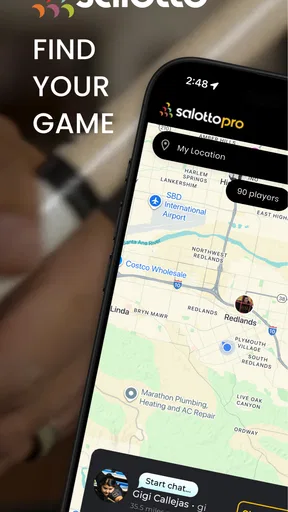
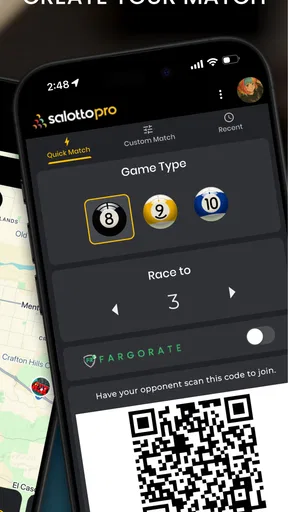
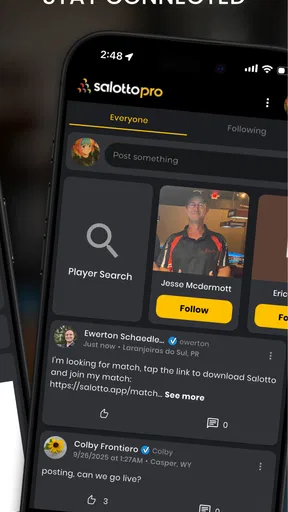
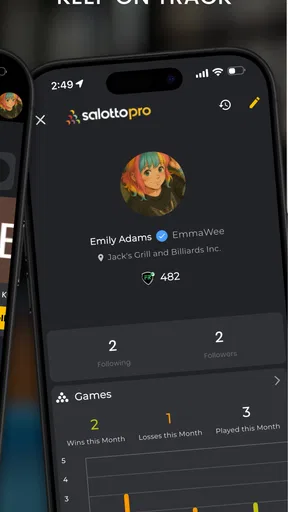
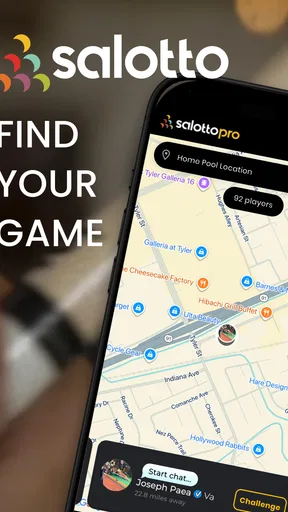
I like sports apps that solve a real problem rather than simply putting scores or news on a phone. Salotto takes a more practical route: it is built around helping pool players find one another, arrange games, and host sessions within a community. After spending time with it, I see the appeal most clearly in a shared household where more than one person plays, or where a player wants to turn an occasional visit to a pool room into a regular social activity.
It is a free sports app from Salotto LLC, with optional in-app purchases ranging from $0.99 to $49.99 per item. The audience is marked Teen, which matters when the app is used on a family phone or alongside younger players. Its average rating sits at 3.6 from around 73 ratings, and it has passed 10K installs. Those figures suggest a modest but active footprint rather than a universal meeting place, so expectations are important: the experience depends heavily on whether other pool players are available in your area.
How Salotto fits into a shared household
The most convincing use case is a home with two people who enjoy pool but do not always play at the same time. One person may be looking for a game after work, while another wants to host or join something at the weekend. Instead of sending several separate messages and waiting for replies, the app gives the household a dedicated place to organize those plans.
I would not treat it as a replacement for a family calendar or a general messaging app. Its value is narrower and more useful: it keeps pool-related coordination close to the people who actually want to play. That focus can reduce the usual back-and-forth, especially when a player is trying to find an opponent outside their immediate circle.
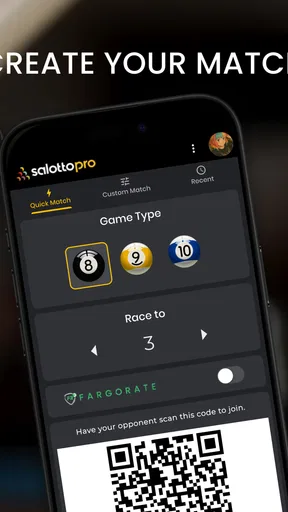
A realistic evening might look like this. I finish work, open the app, and look for a nearby opportunity to play rather than assuming a friend is free. If I find a suitable game, I can use the community context to decide whether it is worth joining. If I am the one arranging the session, I can use Salotto as the starting point for bringing interested players together. The important benefit is not a flashy game mechanic; it is moving from “we should play sometime” to a more concrete plan.
That same scenario exposes the first limitation. A community app is only as useful as the activity around it. In a busy pool scene, Salotto can make discovery easier. In a quiet area, the app may feel empty even though the idea is sound. I would check the local activity before relying on it as my only way to find a game.
What I would do before adding a household member
Because this is a social sports service, I would keep accounts separate for separate players. A shared phone does not need to mean a shared identity. Each person should know which account they are using before creating or joining a game, otherwise invitations and conversations can become confusing very quickly.
This boundary is especially useful when one household member hosts games and another only joins them. Keeping those roles distinct makes it easier to understand who made an arrangement, who is expected to attend, and which activity belongs to which player. I would also avoid leaving an account signed in on a device that everyone uses casually, particularly if the phone is passed between adults and teenagers.
Salotto is rated for Teen users, so I would discuss the social side with a younger player rather than treating the app like a private score tracker. The age label does not remove the need for ordinary judgment. A parent or guardian should know whether the player is contacting people they already know, joining a public local game, or arranging an in-person meeting with someone new.
My practical setup would be simple. I would install the app on the device used by the player, create an account for that player, and agree on what kind of games they are comfortable joining. I would also decide who in the household is responsible for confirming transport and timing. That last step sounds mundane, but it prevents a sports app from becoming the source of avoidable household confusion.
Coordination is the real feature
The strongest part of Salotto is the way it frames pool as a community activity. Many sports apps focus on results, rankings, training plans, or live coverage. Those tools are useful when I already have a match or want to improve alone. Salotto addresses the earlier problem: finding people and turning interest into a game.
That makes it a better fit for a player who is willing to meet others than for someone who only wants to record personal practice. If my goal is cue drills, shot tracking, or technical coaching, a training-focused app would probably serve me better. If my goal is to discover who is available to play, Salotto has a more relevant purpose.
I found that the best way to use this kind of service is to be specific. A vague request such as “anyone playing?” leaves too much work for everyone else. A clearer plan gives people something they can accept or decline quickly. I would include the intended time, general location, and whether I am looking for a casual game or a more serious session whenever the app’s available fields allow that kind of detail.
Another useful habit is to treat the app as the first step in coordination, not the entire arrangement. Once a game is agreed, I would confirm the practical details through the communication method that everyone already understands. That avoids relying on assumptions about arrival time, equipment, or venue access. Salotto can help connect players, but it cannot make an ambiguous plan clear by itself.
Hosting also changes the responsibility. When I host, I am not merely searching for an opponent; I am helping set expectations for the group. I would avoid accepting more people than the session can reasonably handle, and I would make the meeting point clear before anyone travels. The app’s community angle is most successful when users treat one another’s time seriously.
Where it differs from the usual alternatives
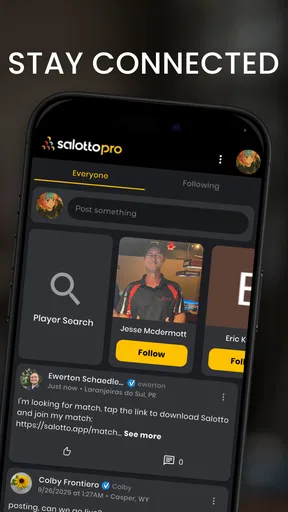
The usual alternative is a private group chat. That works well when I already know the local players, but it becomes awkward when I want to meet someone outside my existing contacts. Messages disappear into unrelated conversations, and a new player may not know whom to ask. Salotto’s sports-specific identity gives the search a clearer home.
A general social network can provide reach, but it usually brings too much unrelated content and too little structure for a simple pool session. A venue’s own noticeboard or informal word of mouth can be effective in an established local scene, yet those methods are hard to use when I am new to the area. Salotto sits between those options: more focused than a broad social platform and more open than a private circle.
On the other hand, a dedicated venue community may be better if I always play at one pool hall and already know its regulars. In that situation, the venue’s own communication channel may have more immediate activity. Salotto becomes more attractive when I want to look beyond one location or connect with players who are not already part of my routine.
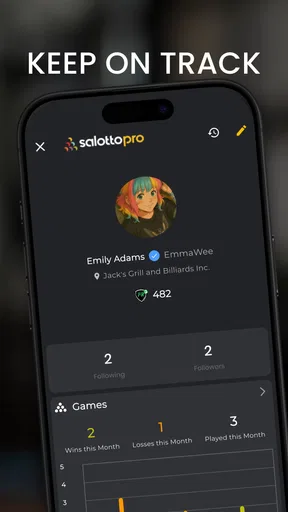
I also would not compare it directly with a live-score or tournament app. Those products answer a different question. They help me follow competition or document results, while Salotto is about participation and connection. Choosing between them depends on whether I am trying to watch, measure, or actually arrange a game.
Account boundaries, trust, and meeting safely
Shared-device use deserves more attention than it usually gets. If several people use one phone, I would check the active account before responding to anything. A quick glance at the profile or account area can prevent one person from accidentally accepting an invitation meant for another. I would also sign out or switch accounts when handing the device to someone else, especially if private conversations are visible.
I would keep personal household information out of public-facing messages unless it is genuinely needed for the game. Pool coordination normally requires a time and place, not a full description of where someone lives or who else is at home. Meeting in a familiar public venue is a sensible boundary for any first-time contact made through a community app.
For a teenager, I would prefer a parent or trusted adult to know the plan before an in-person game. That does not mean the app is unsuitable for every younger player, but the Teen rating is a reminder that social contact is part of the experience. The safest arrangement is one where the player understands who they are meeting, where the game is taking place, and how they will get home.
Adults should apply the same common sense. A profile connected by a shared interest is not the same as a trusted friend. I would start with a public session or a group setting rather than immediately arranging a one-on-one meeting in an unfamiliar place. If the other person pressures me to move faster than I am comfortable with, I would treat that as a reason to stop coordinating.
There is also a trust issue around reliability. Someone can look enthusiastic in a community and still cancel or arrive late. I would avoid building an important evening around a newly contacted player until they have shown that they communicate clearly. Salotto can improve discovery, but it cannot guarantee compatibility, punctuality, or good manners.
Version, access, and the cost question
The current version is 3.16.0, and the app runs on Android 7.0 or later. That makes it accessible on many older Android devices, which is helpful if a household keeps an older phone for shared use. I would still make sure the device is updated enough for everyday security and that the person using it can reliably receive notifications or check plans.
The download itself is free, which lowers the barrier for trying the community. Optional purchases are available, priced from $0.99 to $49.99 per item. I would begin with the free experience and only consider spending after understanding which part of the app I use regularly. A purchase should solve a clear need, not become an automatic cost simply because the app is installed.
This pricing range also makes shared-device boundaries important. If several people use the same phone, I would make sure everyone understands that an in-app purchase can affect the household’s payment method. I would not let a younger user explore purchase screens without an adult checking what is being selected. The free entry point is useful, but it does not mean every option inside the app is free.
For someone with an older Android phone, compatibility is a practical advantage. For someone on iOS, I would check the relevant platform listing before planning around the service, because the experience and availability should be confirmed on the device being used. I would not assume that a household’s Android and iPhone users will have identical menus or account behavior.
Who will enjoy it, and who should skip it
I would recommend Salotto to a pool player who wants more opportunities to play and is comfortable taking part in a community. It is particularly useful for newcomers to a city, occasional players who have lost touch with their usual group, and hosts who want a more focused way to invite interested people.
It also makes sense for a household where one person plays often and another is just starting to build a social routine around the sport. Separate accounts and clear plans can let both people use the same device without pretending they have the same schedule or preferences.
I would be more cautious about recommending it to someone who wants a polished solo training tool, detailed performance analysis, or a guaranteed stream of nearby opponents. The app’s purpose is social coordination, so it cannot fix a lack of local participation. A player who dislikes meeting unfamiliar people may also get more value from a private club, a known venue, or a direct group chat.
The rating of 3.6 from around 73 ratings is another reason I would frame it as worth trying rather than an essential download for every pool player. It has a real audience, with more than 10K installs, but it is not so large that local availability can be assumed. I would install it, inspect the activity near me, and decide based on what I can actually use rather than on the concept alone.
My household verdict
Salotto works best when I treat it as a focused bridge between interest and an actual pool session. Its strength is not replacing every other communication tool; it is giving pool players a place to look for games, host them, and meet others who are already interested in the same activity.
For shared households, the winning routine is straightforward: keep accounts separate, agree on who is using the device, confirm plans clearly, and apply extra care when a younger player is meeting someone new. Those boundaries make the app easier to manage without taking away its social purpose.
I would recommend giving it a trial if pool is already part of your life and you want to widen your circle. I would skip it if you need private training analysis or if there is no active pool community within practical travelling distance. Its real value depends less on the phone and more on the quality of the local connections it helps you make.
After using it, my view is positive but measured. Salotto is a useful sports-community app with a clear purpose, a free starting point, and enough flexibility to support casual household coordination. It is not a guarantee of a good opponent or a substitute for personal judgment. Used with realistic expectations, it can turn an empty evening and a cue case into a genuine chance to play.
Verdict
Strengths of Salotto
- Simple interface makes joining conversations quick and approachable.
- Supports casual social interaction without requiring lengthy profile setup.
- Useful for discovering new people and varied conversation topics.
- Chat-based format can be more engaging than passive social feeds.
- Available on mobile, making conversations accessible while on the go.
Limitations of Salotto
- Conversation quality may vary greatly depending on the users you meet.
- Some features or communities may require registration or account details.
- Public chats can raise privacy concerns if personal information is shared.
- Notifications may become distracting during periods of frequent activity.
- The app’s usefulness depends heavily on having an active user community.
Similar Picks in This Category
View All
BeSoccer: Soccer Live Score
BeSoccer apps4.3

Cricbuzz - Live Cricket Scores
Cricbuzz.com3.7

NFL
NFL Enterprises LLC2.4

Da Fit
MO YOUNG LIMITED3.6

ESPN
Disney4.5

LiveScore: Live Sports Scores
LiveScore Limited4.5
Frequently Asked Questions
What is Salotto and what can I use it for?
Salotto is a social communication app designed to help people connect, chat, and participate in conversations from their mobile devices. Depending on the available features and your region, you may be able to create a profile, discover other users, join discussions, and exchange messages. It is best suited to users looking for a casual, community-focused way to meet people online.
Is Salotto free to download and use?
Salotto can generally be downloaded free of charge, although some features may require in-app purchases, subscriptions, or other paid options. Before confirming any payment, review the pricing information shown in the app store and inside the application. Availability of premium tools, advertisements, and payment plans may differ between Android and iOS versions or according to your location.
Do I need to create an account to use Salotto?
An account may be required to access Salotto’s main social and communication features. Registration commonly involves providing basic information and choosing login credentials, while some versions may also support third-party sign-in methods. Use an email address or account you can access, and review the privacy settings carefully so you understand what profile information may be visible to other users.
Is Salotto safe for chatting and meeting other users?
Salotto should be used with the same care as any social networking or chat platform. Avoid sharing your home address, financial information, passwords, private documents, or precise location with strangers. Use available blocking and reporting tools if someone behaves abusively or suspiciously. Parents and guardians should also check whether the app’s content and communication features are appropriate for younger users.
What should I check before downloading Salotto?
Before installing Salotto, check that your Android or iOS device meets the required operating-system version and has enough free storage. Read the current store listing for permissions, age rating, privacy practices, subscription terms, and recent user feedback. A stable internet connection may be necessary for messaging and community features, and some functions could vary depending on your country or device.
